A sheet prepared for the printing works
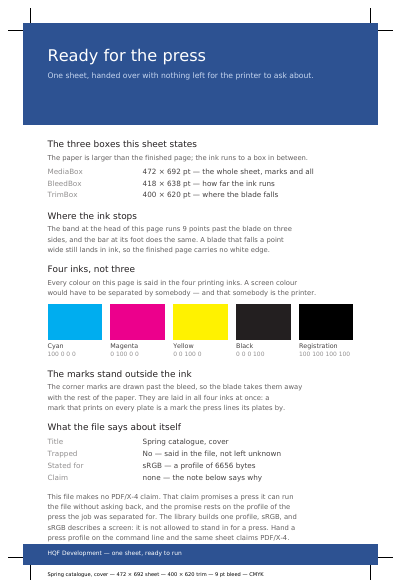
A printing works spends its day opening files it has to ask questions about: does the colour reach a little past the line the blade will follow, where exactly is that line, are the colours stated in the inks a press lays down or in the colours of a screen. This sheet answers all of it before anybody writes back. The paper is deliberately larger than the finished page: 472 by 692 typographic points of sheet for a finished page of 400 by 620. Thirty-six of those points stand on each side, nine of them for the colour to run past the cut and the rest so the trim marks have room outside it. The page names all three: the paper, how far the colour runs past the cut, and the cut itself.
It also prints what the file says about itself: the name of the job, the profile of the device it is stated for, and a yes or no on trapping — the hair's breadth of overlap given to two touching colours so that a sheet moving slightly on the press opens no white line between them. The claim to the print standard is yours to complete, and it takes one thing. PDF/X-4 rests on the colour profile of the press the job was separated for, which is the one piece only your own printing works can hand you: give the engine that profile and this very same sheet claims PDF/X-4. Left to itself the library builds a profile describing a screen, which is the right description for a document read on one. Either way, the profile travelling inside your document is the one you chose, and it is the only one in there.
What this example shows
- Bleed running nine typographic points — three millimetres — past the cut, so a blade a hair out of line still lands in ink.
- Trim marks standing outside the colour, laid in all four inks at once so every printing plate carries them.
- Every colour said in the inks a press lays down, and what the file declares printed on the page.
The source code, complete
Nothing is left out and nothing is simplified: this is the program exactly as it runs, for the developer who uses this library.
The third is the description itself: a plain list of what the page has to say, which is what the service is sent.
Read the Rust source
Read the Python source
Read the JSON source
The document itself
Open the document in English
Open the document in French