A month's report, its charts drawn in curves
A pie of where the hours went, a ring gauge of how far into the year the work is, a card with eased corners, and arcs told where to go rather than how far to turn.
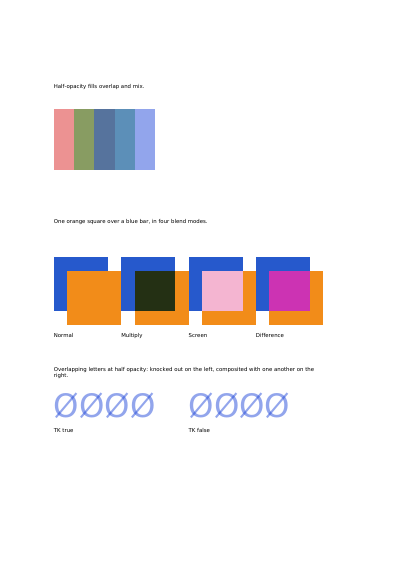
A watermark that hides the text under it is useless, and a highlight that is not see-through is a blot. Both want the same thing: paint that lets what is underneath come back through, by a stated amount, without anybody having to work out what the mixed colour would be and paint that instead.
The other half of the page is about what happens when one colour lies over another, and there are four answers to pick from. They stand on the page under the names every drawing program knows them by. Normal simply covers: the square hides the bar, and that is what is wanted nearly all the time. Multiply darkens — it is exactly how a highlighter pen behaves on paper, which makes it the one to reach for when the words underneath have to stay readable. Screen does the opposite and lightens, for a glow or a pale wash over a dark photograph. Difference is the odd one out and serves checking rather than design: lay two versions of the same page over each other and everywhere they agree comes out black. All four are on the page below, the same orange square over the same blue bar each time, with the name of the mode beside it. Whichever is set holds for everything drawn after it until it is taken back off, so a watermark can be laid across a whole page without touching a word of what is under it.
At the foot of the page the same line is written twice at half strength, each letter crossed by a stroke that lies over it. On the left the line is painted as one piece, so where a stroke crosses its letter the colour goes down once and stays as light as the rest. On the right each shape is painted on its own, and every crossing comes out darker, the way two strips of tinted film do where they overlap. Not every reading program honours the difference: one that does not shows the two lines alike.
Nothing is left out and nothing is simplified: this is the program exactly as it runs, for the developer who uses this library. The third is the description itself: a plain list of what the page has to say, which is what the service is sent.
Read the Rust source Read the Python source Read the JSON source
A pie of where the hours went, a ring gauge of how far into the year the work is, a card with eased corners, and arcs told where to go rather than how far to turn.
The same area of stripes shown through two windows: a plain disc, and a ring whose middle is left bare.
Five panels: a header that fades out, the same fade on the diagonal, a glow carried past its own circle so the corners fill, a blend that goes by way of a third colour, and a checkerboard whose colour is worked out from where each point stands, redder to the right and greener towards the top.
A gradient used as the colour something is filled with: a headline whose letters are windows onto a blend of three colours, and a panel filled with a circular one.
Six triangles round a centre they share, their edges stroked over the paint; a lattice of points in the four printing inks; a patch whose four sides are curves; and the same patch pulled about by four points inside it.
The same floor plan on six layers shown and hidden one at a time: the furniture and the distances shown, the internal notes hidden until asked for, and a draft watermark meant for the screen and not for the paper.