A month's report, its charts drawn in curves
A pie of where the hours went, a ring gauge of how far into the year the work is, a card with eased corners, and arcs told where to go rather than how far to turn.
A photograph with rounded corners. A chart that stops dead at the edge of its frame instead of running over the caption underneath. A map that shows one county and stops at its border. In all three, something is drawn whole and only part of it is meant to show — and the usual way out is to go back and edit the picture itself, once per page, once per size, once per set of colours.
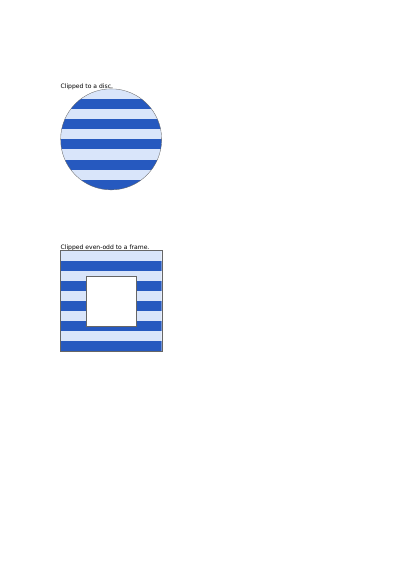
Here the shape is cut on the page instead: a window is put down, the drawing goes through it, and whatever falls outside never lands on the paper. The same area of stripes is shown through two windows. The first is a plain disc: the stripes stop at its edge and the rest of the square stays bare. The second is a ring — a square with a smaller square taken out of its middle — so the stripes show in the band between the two and the middle stays empty. A window with a hole in it is the one worth looking at, because an outline sitting inside another outline can be read as a hole or as solid ground, and the file says which. Each window shuts again at the end of its own panel, so nothing carries over into what is drawn next.
Nothing is left out and nothing is simplified: this is the program exactly as it runs, for the developer who uses this library. The third is the description itself: a plain list of what the page has to say, which is what the service is sent.
Read the Rust source Read the Python source Read the JSON source
The document is lighter than it was, and every page still looks exactly the same. See this document's row in the table of every example.
A pie of where the hours went, a ring gauge of how far into the year the work is, a card with eased corners, and arcs told where to go rather than how far to turn.
Half-transparent fills that overlap and mix, one orange square laid over a blue bar in four different ways of mixing colours, and a line of overlapping letters painted two ways.
Five panels: a header that fades out, the same fade on the diagonal, a glow carried past its own circle so the corners fill, a blend that goes by way of a third colour, and a checkerboard whose colour is worked out from where each point stands, redder to the right and greener towards the top.
A gradient used as the colour something is filled with: a headline whose letters are windows onto a blend of three colours, and a panel filled with a circular one.
Six triangles round a centre they share, their edges stroked over the paint; a lattice of points in the four printing inks; a patch whose four sides are curves; and the same patch pulled about by four points inside it.
The same floor plan on six layers shown and hidden one at a time: the furniture and the distances shown, the internal notes hidden until asked for, and a draft watermark meant for the screen and not for the paper.