Declaring Colour beyond Red, Green and Blue
Name a separate ink, a measured colour or a profile, so the document speaks of it in more than three numbers.
See It in a Real PDF
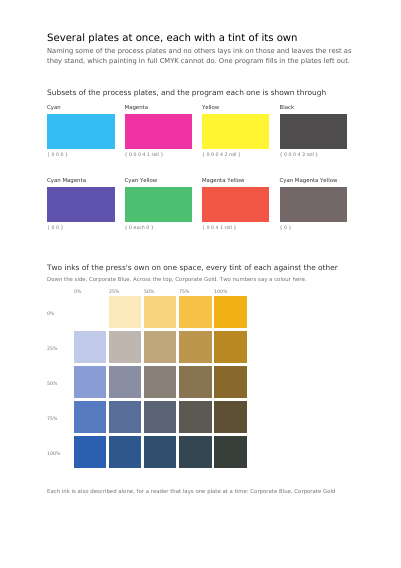
Several Plates at Once, Each at Its Own Strength
Eight choices of plate among the four usual inks, each with the small program that shows it printed underneath, and two inks the press carries itself used together, every strength of one against every strength of the other.
Open the PDF The Whole Example
Also shown in: A Colour Chart the Drawing Points Into · Colour the Document Defines · Gradients in a Line, in a Circle, and Read from a Function
Summary
A brand's blue is not a blue approximated on a screen: it is a precise pot of ink, ordered from the maker, with a number on it. A printing works lays it down as a separate ink, on top of the usual four, and it comes out the same on every run. A colour can also be described by its real measurement, the one an instrument takes in a laboratory, rather than by a recipe that only means something to a screen.
Technically
Written at the top level of a request, under
"color_spaces"
color_spaces declares the colour spaces written into the document, each under the name a colour selects it by. A device colour needs no declaration: three plain numbers are device red, green and blue wherever they appear. A spot ink, a measured space or a profiled one is written into the document before a colour names it. Eight kinds exist — /Separation for a spot ink, /DeviceN, /Indexed, /Lab, /CalRGB, /CalGray, /ICCBased and /Pattern, the space a repeating cell stating no colour of its own is laid down through — each stated by its own numbers, save the ICC space, whose profile arrives as a supplied part.
Request Schema
-
color_spaces— array, optional, empty by default. -
color_spaces[].name— string, required. The name the request's colours select this space by. -
color_spaces[].space— object, required. Eight kinds:separation—colorantstring required;inkarray of four numbers optional;transformobject optional. Exactly one of the two: both together are refused, neither is refused too.indexed—baserequired, same recursive shape;entriesarray of bytes from 0 to 255 required, 256 entries at most.lab—white_pointthree numbers required;black_pointthree numbers optional;rangefour numbers optional, −100 to 100 by default.cal_gray—white_pointthree numbers required;black_pointoptional;gammanumber optional, 1 by default.cal_rgb—white_pointthree numbers required;black_pointoptional;gammathree numbers optional, 1 by default;primariesthree by three numbers optional.icc—profilestring required, the name of a supplied part;spaceoptional, otherwise read from the profile.device_n—colorants, an array of the inks' names as the press knows them, required;alternate, the space the tint lands in, andtint, the function turning the tints into a colour in it, taking as many numbers in as there are colorants and as many out asalternatetakes, both required;attributesoptional, what the inks look like one by one wheretintsays only what they look like together —colorants, a list of inks each said as aseparationis, andprocess, aspaceand onecomponentsname per component of it.device_nattributes.n_channel— boolean, optional,falseby default.truewrites the space as the kind the standard calls NChannel, which reading software shows plate by plate without its overprint preview. Such a space describes every spot ink it lays down, names the process space of any process ink (Cyan, Magenta, Yellow and Black always count as one), lays down no ink named None, and lays down the components of a process space other than CMYK one after another, in that space's order; a space breaking one of these rules is refused.device_nattributes.mixing_hints— object, optional. How the inks mix, for reading software that blends them itself rather than throughtint:solidities, each ink's name against how far it covers what lies beneath it, from 0 to 1, anddefault_solidityfor an ink not named;printing_order, the inks in the order they are laid down, the one nearest the paper first, every colorant of the space among them;dot_gains, each ink's name against a function taking the tint asked for to the tint printed, anddefault_dot_gainfor an ink not named. Reading software is free to ignore them. A solidity outside 0 to 1, an ink named Default and a printing order naming an ink twice or leaving out a colorant of the space are refused.pattern—baserequired, the space the colour the cell is laid down in is stated in, said either by the name of a device space (gray,rgb,cmyk) or in full as a declared space states itself. A pattern space is refused as the base. A colour in it is the numbers the base space takes and the name of the cell, so one cell is laid down in red here and in blue there.
-
transform—alternaterequired, the device space (gray,rgb,cmyk) the numbers the function gives are a colour in; andfunctionrequired, the function the tint is read through, written under the name of its kind, one number in and as many out asalternatetakes. The four kinds and their keys are the onesshadingsstates:exponential, withlowandhighrequired anddomain,exponentandrangeoptional,stitching,sampledandcalculation. -
A colour names a declared space through the shape
{"space": "the name", "components": n, …}. The short forms stay available:[g]for a grey,[r, g, b],[c, m, y, k], and{"gray": n}.
A Whole Request That Creates a PDF
{
  "color_spaces": [
    {
      "name": "brand_blue",
      "space": {
        "separation": {
          "colorant": "Corporate Blue",
          "ink": [0.92, 0.58, 0.0, 0.06]
        }
      }
    }
  ],
  "items": [
    {
      "type": "rect",
      "rect": { "llx": 60, "lly": 700, "urx": 300, "ury": 780 },
      "fill": { "space": "brand_blue", "components": [1.0] }
    }
  ]
}Colour and how it is shown
The Device the Colours Are Stated For Which Plate of a Separated Sheet a Page Is The Device One Page's Colours Are Stated For What a Page's Bare Numbers Mean A Colour Sliding into Another Opacity, Mixing, and What a Press Asks For A Cell Repeated to Fill a Shape The Space a Page Mixes Its Colours In
Where to Go Next
Every JSON key of a request, in one page The other forty-one settings of a request