What a Page's Bare Numbers Mean
Say which declared colour space a page's one, three and four-number colours are read through, and how its marks are composited.
See It in a Real PDF
The Same Numbers, Said so They Mean Something
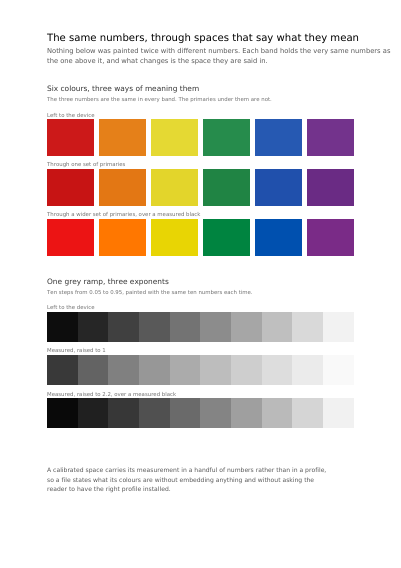
Six colours and a grey ramp painted three times over with the very same numbers: first left to the device, then said in two ways that state the white they are measured against, the curve applied to them, and how far the base colours reach. A second page paints bare numbers that say nothing about what they mean, and lets the page itself say it for them. All of that travels in a handful of numbers, with no profile to carry.
Summary
A colour written as three numbers means nothing on its own: the same three numbers are one colour on a screen and another on a press. A page can name the colour space its bare numbers are read through — one for the greys, one for the three-number colours, one for the four-number ones — so the same request comes out the same colour wherever it is shown.
Technically
Written at the top level of a request, under
"page_spaces"
page_spaces writes the /DefaultGray, /DefaultRGB and /DefaultCMYK of a page, and the transparency group it is composited in. Each names a colour space the request declared under color_spaces; a name the request never declared is refused. group stands over the group the document states for every page. A page named twice takes the last entry given for it, whole.
Request Schema
-
page_spaces— array, optional, empty by default. -
page_spaces[].page— integer ≥ 1, required. The page the entry is for. -
page_spaces[].gray— string, optional. The declared space the page's one-number greys are read through. Absent, a grey is whatever the device makes of it. -
page_spaces[].rgb— string, optional. The declared space its three-number colours are read through. -
page_spaces[].cmyk— string, optional. The declared space its four-number colours are read through. -
page_spaces[].group— object, optional. How the page's marks are composited:space— string, required, the declared space they are combined in;isolatedandknockout— booleans, false by default.
A colour stated through color_spaces on the item itself is read as the item says: what a page settles here is only what a bare number means.
A Whole Request That Creates a PDF
{
  "color_spaces": [
    {
      "name": "house_blue",
      "space": {
        "separation": { "colorant": "House Blue", "ink": [0.92, 0.58, 0.0, 0.06] }
      }
    }
  ],
  "page_spaces": [{ "page": 1, "gray": "house_blue" }],
  "standard_fonts": [{ "name": "sans", "face": "helvetica" }],
  "items": [
    {
      "type": "text",
      "rect": { "llx": 60, "lly": 740, "urx": 535, "ury": 765 },
      "content": ["One number, read through a space the request declared"],
      "font": "sans",
      "font_size": 14
    }
  ]
}Colour and how it is shown
The Device the Colours Are Stated For Which Plate of a Separated Sheet a Page Is The Device One Page's Colours Are Stated For Declaring Colour beyond Red, Green and Blue A Colour Sliding into Another Opacity, Mixing, and What a Press Asks For A Cell Repeated to Fill a Shape The Space a Page Mixes Its Colours In
Where to Go Next
Every JSON key of a request, in one page The other forty-one settings of a request