A Cell Repeated to Fill a Shape
Draw one small cell and have it laid down over and over to fill a shape: hatching, a weave, a background of dots.
See It in a Real PDF
One Pattern, Repeated across Whatever It Fills
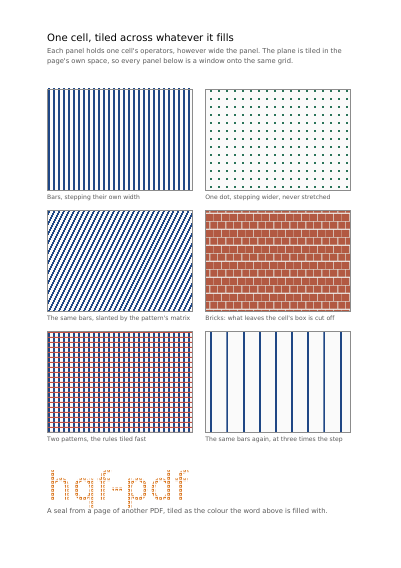
Six panels filled with repeating patterns — bars, dots, a slant got without redrawing the pattern, a brick wall, two patterns crossing, a wider gap — and a name in large letters filled with a seal taken from a page of another PDF.
Open the PDF The Whole Example
Also shown in: One Hatch, Laid Down in Any Colour You Like
Summary
Think of a tiled floor. You do not draw every tile: you draw one, and you say how far apart they sit. It costs the file one cell however large the shape is. Put the cells further apart than the cell is wide and you get gaps between them; closer, and they overlap, the later one over the earlier. A cell that never moves is refused: it would be laid down for ever in the same place.
Technically
Written at the top level of a request, under
"tilings"
tilings declares the repeating cells the document defines for itself as /PatternType 1 tiling patterns, each under the name a shape's fill selects it by. box is the /BBox, the area of the cell's own space that is laid down, and nothing outside it is drawn. step is the /XStep and /YStep, how far apart the cells are placed, across and up: wider than the box leaves a gap, narrower overlaps them, and a step of nothing at all is refused. colored settles the /PaintType: a cell that does not state its own colours takes the colour of whatever fills with it, which is what lets one hatching serve in any colour. spacing says how reading software may trade the step against the cell, and absent keeps the step exact. A name declared twice keeps the last.
Request Schema
-
tilings— array, optional, empty by default. -
tilings[].name— string, required. The name a fill selects this cell by. A name declared twice keeps the last. -
tilings[].box— object, required, ofllx,lly,urxandury. The area of the cell's own space that is laid down. -
tilings[].step— array of two numbers, required. How far apart the cells are placed, across and up. A step of nothing at all is refused. -
tilings[].colored— boolean, optional,trueby default. Whether the cell states its own colours. A cell that does not takes the colour of whatever fills with it, which is what lets one hatching serve in any colour. -
tilings[].spacing— string, optional. How reading software may trade the step against the cell:constant,undistorted,constant_and_fast. Absent keeps the step exact. -
tilings[].items— array, required. The shapes the cell is made of, in the order they are drawn, as a declared drawing takes them. -
tilings[].matrix— array of six numbers, optional. What the tiled plane's own space is, in the page's space. Absent tiles it in the page's own space, so a hatch is slanted by mapping the plane rather than by drawing a slanted cell. -
tilings[].pdf_pages— array, optional, empty by default. Pages of supplied PDFs the cell draws under its shapes, each naming the part it comes from inpdf, which page inpage(the first by default), where its lower-left corner sits inxandy(zero by default) and its scale inscale(one by default): a seal or a motif cut from a scan, tiled across an area. A part the request did not supply is refused.
Scope: the whole document. A shape reaches a cell by naming it where it would name a colour, and the cell is laid down in page coordinates, so two shapes filled with the same cell line up with each other.
A Whole Request That Creates a PDF
{
  "tilings": [
    {
      "name": "upright",
      "box": { "llx": 0, "lly": 0, "urx": 8, "ury": 8 },
      "step": [8, 8],
      "spacing": "constant",
      "colored": true,
      "items": [
        {
          "type": "rect",
          "rect": { "llx": 0, "lly": 0, "urx": 3, "ury": 8 },
          "fill": [0.12, 0.28, 0.52]
        }
      ]
    }
  ],
  "items": [
    {
      "type": "rect",
      "rect": { "llx": 72, "lly": 600, "urx": 320, "ury": 740 },
      "fill": { "pattern": "upright" }
    }
  ]
}Colour and how it is shown
The Device the Colours Are Stated For Which Plate of a Separated Sheet a Page Is The Device One Page's Colours Are Stated For Declaring Colour beyond Red, Green and Blue What a Page's Bare Numbers Mean A Colour Sliding into Another Opacity, Mixing, and What a Press Asks For The Space a Page Mixes Its Colours In
Where to Go Next
Every JSON key of a request, in one page The other forty-one settings of a request