Which Plate of a Separated Sheet a Page Is
Say that a page is one plate of a sheet, and name the ink it is printed in.
See It in a Real PDF
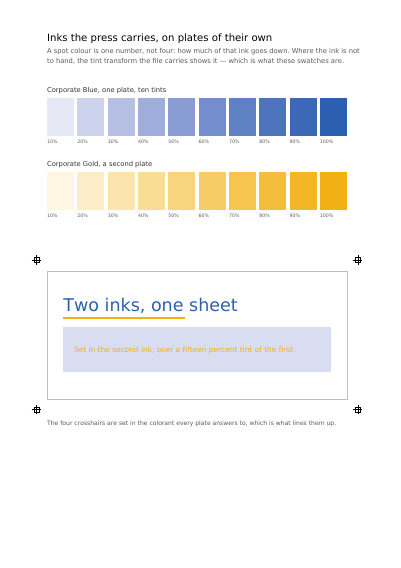
Two inks the press carries on a plate of their own, each at ten strengths, a piece of work set in both, and the alignment crosses used to line the plates up — drawn in an ink every plate answers to.
Summary
A colour job is printed one ink at a time: a plate for the black, a plate for the red, a plate for the varnish. A document can carry those plates as pages and say so — this page is the red of sheet one, that page the black of the same sheet — and reading software then shows the sheet whole rather than as four pages that look wrong on their own.
Technically
Written at the top level of a request, under
"page_separations"
page_separations writes the /SeparationInfo of a page: the ink the page carries, and the sheet the page is a plate of. Pages sharing a sheet number are the plates of one sheet, and a sheet of a single plate is a page printed in one ink. No colour book is read: the colorant is the customer's own name for the ink. space names a colour space the request declared, so that reading software knows what the plate's tints come to; a name the request never declared is refused.
Request Schema
-
page_separations— array, optional, empty by default. -
page_separations[].page— integer ≥ 1, required. The page this plate is. -
page_separations[].colorant— string, required. The name of the ink, as the press knows it. -
page_separations[].sheet— integer, required. The sheet the page is a plate of; pages sharing it are plates of the same sheet. -
page_separations[].space— string, optional. The declared colour space the ink is stated in.
A page named twice takes the last entry given for it, whole, and a page nothing names is a page of its own rather than a plate.
A Whole Request That Creates a PDF
{
  "page_separations": [
    { "page": 1, "colorant": "Black", "sheet": 1 }
  ],
  "standard_fonts": [{ "name": "sans", "face": "helvetica" }],
  "items": [
    {
      "type": "text",
      "rect": { "llx": 60, "lly": 740, "urx": 535, "ury": 765 },
      "content": ["The black plate of the first sheet"],
      "font": "sans",
      "font_size": 14
    }
  ]
}Colour and how it is shown
The Device the Colours Are Stated For The Device One Page's Colours Are Stated For Declaring Colour beyond Red, Green and Blue What a Page's Bare Numbers Mean A Colour Sliding into Another Opacity, Mixing, and What a Press Asks For A Cell Repeated to Fill a Shape The Space a Page Mixes Its Colours In
Where to Go Next
Every JSON key of a request, in one page The other forty-one settings of a request