One rule instead of a hundred colours
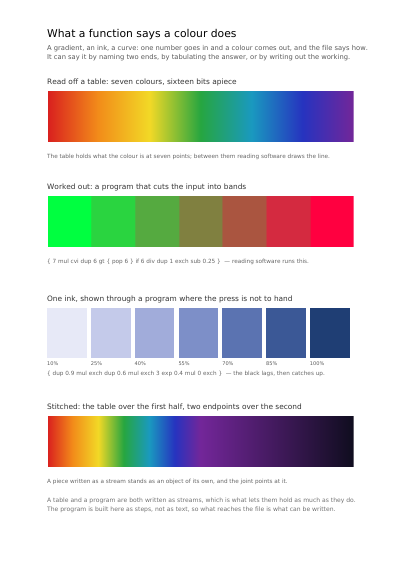
A gradient from blue to white, a printing ink you want twenty strengths of, a curve that lifts colours that came out too dark: in all three there is no one colour to write down, there is a rule that makes every one of them. Writing the colours out one by one means hundreds of lines inside the file and a document heavier than it needs to be; writing the rule down means three lines, and reading software works out the rest. This page shows the four kinds of rule a PDF knows how to follow, with the rule that drew each panel printed under it.
The first is a table: you give the colour at seven points along the way and reading software draws the line between them, which is what you want when the colours come off a measurement and no formula would ever land on them. The second is a short piece of working reading software runs itself, and it does what no table can — the panel it draws cuts the range into seven flat bands instead of sliding, which is how a shaded map is made to read at a glance. The third is that same working applied to one printing ink, so a press ink can be shown on a screen that has never seen it. The fourth is two of the others joined end to end, one covering the first half of the range and one the second, which is how a gradient changes its mind halfway without being cut into two shapes.
What this example shows
- The four kinds: a table of measured colours, a short piece of working, a rule for one ink, and two rules joined end to end.
- The rule that drew each panel printed under it, to read together.
- What every gradient and every named ink on this site is built on.
The source code, complete
Nothing is left out and nothing is simplified: this is the program exactly as it runs, for the developer who uses this library.
The third is the description itself: a plain list of what the page has to say, which is what the service is sent.
Read the Rust source
Read the Python source
Read the JSON source
The document itself
Open the document in English
Open the document in French