Everything That Can Be Drawn on a Page
The one required key: the list of what gets drawn, in drawing order. Twenty-five kinds in all.
See It in a Real PDF
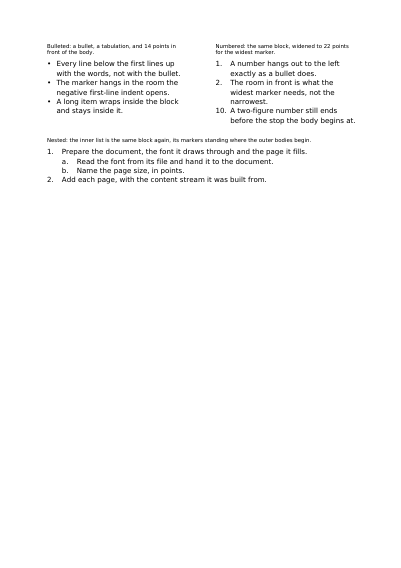
Lists Made from an Indent and a Tab Stop
Bulleted, numbered and nested lists, each built out of an indent that hangs out to the left and one tab stop rather than out of a dedicated list object: the marker sits in the room the indent opens, and every line below the first begins where the tabulation put the text.
Open the PDF The Whole Example
Also shown in: A Multi-Page Invoice Table · Cells Merged Down the Rows · Pictures inside Table Cells
Summary
Everything else settles the document; this one fills it. Text, a table, a photograph, a barcode, a line, a tick box: each thing says what it is and where it goes. The last one written passes over the ones before, like sheets stacked on a desk, which is how a stamp ends up on top of the page it crosses.
Technically
Written at the top level of a request, under
"items"
items is an array, in drawing order, where each entry has a type key saying which of the twenty-five kinds it is; that order is paint order, so a later item covers an earlier one. Most kinds share a common base of settings: the rectangle they live in, the pages they appear on, the layer they belong to, a rotation or a transform. Each kind has a detail page of its own.
Request Schema
-
items— array, optional, empty by default. A request without it draws nothing of its own: blank pages, or the pages itssourceopens with. -
Each entry is an object carrying
type, or an array whose first element is the label. An object with notypeis refused; twotypekeys in one object are refused too. -
Twenty-five
typevalues, each with a page of its own, listed below. -
Settings most kinds share:
pages, either an array of one-based integers, empty by default and meaning every page, or a rule:every, one ofpage(the default),odd_pageoreven_page;fromandto, one-based page numbers, each included, absent running from the first page and to the last;but, an array of pages left out, each a number or an expression, so"{page_of_headline}"leaves out the page an item opened on.layer(the name of a declared layer),idandrelative_to(placement relative to another item),transform(six numbers) orrotate(degrees) — both together are refused.
The Twenty-Five Things an Item Can Be
Each has a page of its own: what it is, what it does technically, the schema of the request it takes, and a whole request showing it.
Text
-
A Block of Text Placed on the Page
textSet text inside a chosen rectangle, with its font, size and colour, and give one word in the middle of a sentence a style of its own. -
Text in Paragraphs, with Indents and Tab Stops
flowLay several paragraphs in a frame, with a first-line indent, space between them, bulleted lists and neat columns of figures. -
A Stamp Laid across the Page
stampLay one word across an area, at the size that fills the box: draft, paid, copy, cancelled, on the diagonal or flat. -
A Line of Words Set Along a Path
text_pathRun one line of text round a seal, over an arch or along the edge of a map: every letter stands on the curve and leans the way it leans. -
A Row of Glyphs Asked for by Their Number
glyphsSet the shapes a font holds by their number in the file — the forms no key reaches — and say what each one stands for when it is copied. -
Blocks Laid One under the Other, Page After Page
stackPile paragraphs, tables, pictures and rules in reading order and let them find their own pages: what does not fit carries on in the box of the next one.
Tables
-
A Table That Carries on from Page to Page
tableRows and columns flowing over as many pages as needed, with a repeated header, rules, coloured backgrounds and merged cells.
Pictures and imported pages
-
A Picture Placed in a Rectangle
imagePlace a photo or a logo supplied with the request in a chosen frame, stretched to the edges or kept at its own proportions. -
A Page of a Supplied PDF, Placed on the Page
pdf_pageTake one page of a PDF sent with the request and place it in a frame, at its own proportions, among the other items.
Barcodes and Square Codes
-
A Barcode of Vertical Bars
barcodeDraw a barcode a scanner reads: Code 128, Code 39, Code 93, ITF-14, Codabar, EAN-13, UPC-A, EAN-8, UPC-E, GS1 DataBar and the two add-ons. -
A Square QR Code, Read with a Phone
qrDraw a QR code carrying a web address or a piece of text, read by any phone, with its white margin all around. -
An Aztec Code, with No White Margin around It
aztecDraw an Aztec code, the one on train tickets: square, needing no margin, with the share of safety you choose. -
A Data Matrix Code, Very Small and Very Sturdy
data_matrixDraw a Data Matrix code, the one on parcels and small parts: as much content as a QR code in far less room. -
A PDF417 Code, Carrying a Whole Form
pdf417Draw a PDF417 code of stacked bars, the one on boarding passes: it carries a whole form, not merely a number.
Shapes
-
A Free Path: Lines, Curves and Filled Shapes
pathDraw a shape point by point, with straight segments and curves, filled with a colour or a gradient, and outlined with a stroke. -
A Rectangle, Filled or Outlined
rectPlace a rectangle: a coloured band behind a heading, a frame around an area, or both, with the stroke you choose. -
A Straight Line between Two Points
linePull a line from one point to another, at the thickness, colour and dash you want: a divider, an underline, a ruled row. -
A Drawing Declared Once and Placed as Often as Wanted
drawingPut a drawing the request declared on the page, where you want it and at the size you want, without the file carrying the same ink twice.
Form fields
-
A Field the Reader Types Into
text_fieldAdd a field to fill in: a name, an address, a comment over several lines, a hidden password, or a number one square per digit. -
A Box the Reader Ticks
check_boxAdd a tick box: accepting terms, choosing an option, with the mark you pick and the value the form reports. -
A List the Reader Picks From
choice_fieldOffer a list of answers: an open list, a drop-down menu, or a menu the reader may also type an answer into. -
Several Buttons, One Answer
radio_groupPlace buttons of which only one stays chosen at a time, each in its own spot, all belonging to the same question. -
The Place Kept for a Signature
signature_fieldKeep a spot on the page where an electronic signature will settle, with its name and its frame. -
A Button the Reader Presses
push_buttonPlace a button that acts instead of answering: open an address, go to a page, send the form or reset it.
Navigation
-
A Patch of Page a Reader Clicks
linkMake a patch of page clickable: it opens a web address, or takes the reader to another page of the same document.
A Whole Request That Creates a PDF
{
  "standard_fonts": [{ "name": "sans", "face": "helvetica" }],
  "items": [
    {
      "type": "rect",
      "rect": { "llx": 60, "lly": 700, "urx": 535, "ury": 780 },
      "fill": [0.93, 0.95, 0.98]
    },
    {
      "type": "text",
      "id": "headline",
      "rect": { "llx": 72, "lly": 730, "urx": 523, "ury": 760 },
      "content": ["Drawn second, so it sits on top"],
      "font": "sans",
      "font_size": 16
    },
    {
      "type": "text",
      "rect": { "llx": 72, "lly": 690, "urx": 523, "ury": 712 },
      "relative_to": { "id": "headline", "edge": "bottom", "offset": -18 },
      "content": ["Placed under the line above, wherever that one landed"],
      "font": "sans",
      "font_size": 11
    },
    {
      "type": "text",
      "rect": { "llx": 72, "lly": 60, "urx": 523, "ury": 76 },
      "pages": { "every": "even_page", "from": 3, "but": [7] },
      "content": ["On the even pages from page three, page seven excepted"],
      "font": "sans",
      "font_size": 9
    }
  ]
}What is drawn, and how it comes out
The File's Weight and the Time It Takes The First Page, Shown While the Rest Arrives Layers Reading Software Shows or Hides A Name That Stands for Several Layers at Once A Drawing Made Once, Shown by a Button Drawings Read from SVG Files The Sets of Layers Reading Software Offers Layers Reading Software Shows One of at a Time
Where to Go Next
Every JSON key of a request, in one page The other forty-one settings of a request