Drawings Read from SVG Files
Hand over an SVG file as text and draw it, sharp at any size, wherever a drawing goes.
See It in a Real PDF
A Template Whose Regions Are Filled by Name
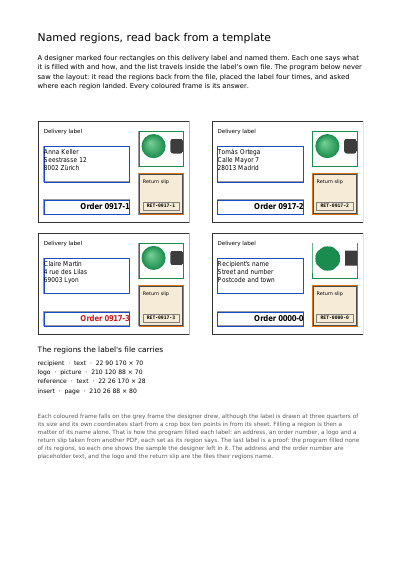
A delivery label on which a designer named four rectangles, read back from its own file, placed four times and filled by those names alone: an address, an order number, a logo drawn from an SVG file and a return slip.
Summary
A logo or a signature often exists as an SVG file, the kind drawing programs and web sites use. You paste the file in and give it a name. It is drawn from its own lines and curves, so it stays sharp however large it is printed.
Technically
Written at the top level of a request, under
"svg_drawings"
svg_drawings reads each SVG file into a form XObject, as large as its outer svg element says and the right way up. It is shown by its name the way a declared drawing is: filled into a region through a pdf_page item's fill, or placed by a drawing item. The file comes as text inside the request, or as a part sent beside it.
Request Schema
-
svg_drawings— array, optional, empty by default. -
svg_drawings[].name— string, required. The name it is shown by. -
svg_drawings[].svg— string, one ofsvgandpart. The SVG file itself, as text. -
svg_drawings[].part— string, one ofsvgandpart. The name of the part sent beside the request that holds the SVG file, as UTF-8 text.
Refused, 400: a file that is not well-formed XML, declares entities of its own, has an outer element other than svg, states no size, or holds a shape or a path that cannot be read.
Refused, 400: a drawing stating both svg and part, or neither; a part that was not sent or is not UTF-8 text; and a name two drawings take, twice in drawings, twice in svg_drawings or once in each. The message names the name and the two places that take it, since a fill or a drawing item naming it could mean either.
A Whole Request That Creates a PDF
{
  "svg_drawings": [
    {
      "name": "seal",
      "svg": "<svg width='64' height='64'><circle cx='32' cy='32' r='26'/></svg>"
    }
  ],
  "items": [
    { "type": "drawing", "drawing": "seal", "x": 72, "y": 680 }
  ]
}What is drawn, and how it comes out
Everything That Can Be Drawn on a Page The File's Weight and the Time It Takes The First Page, Shown While the Rest Arrives Layers Reading Software Shows or Hides A Name That Stands for Several Layers at Once A Drawing Made Once, Shown by a Button The Sets of Layers Reading Software Offers Layers Reading Software Shows One of at a Time
Where to Go Next
Every JSON key of a request, in one page The other forty-one settings of a request