Blocks Laid One under the Other, Page After Page
Pile paragraphs, tables, pictures and rules in reading order and let them find their own pages: what does not fit carries on in the box of the next one.
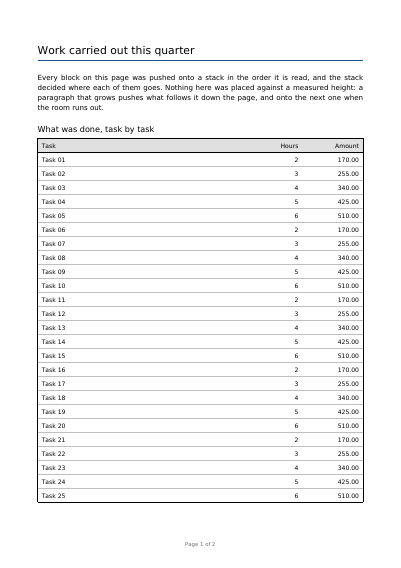
See It in a Real PDF
A title, a rule, two paragraphs, a heading, a table of twenty-six rows and a footnote, handed over in reading order and broken across two pages by the engine.
Open the PDF The Whole Example
Also shown in: A Whole Novel in English · A Whole Novel in French · Showing Page One Before the File Has Arrived
Summary
Think of a report you write without ever deciding where a page ends. You give one frame for the first sheet and one frame for the sheets after — the first is often shorter, because a letterhead sits above it. A paragraph then splits between two lines and a table between two rows, and the table's heading row is drawn again above the part that carried on. You can also say that a block must never be cut, and it moves to the next sheet whole rather than being split. And where a paragraph is cut, you say how many of its lines must stay at the bottom of the sheet and how many must travel to the top of the next, so that no reader ever meets an orphan line or a widow line.
Technically
Asked for with
"type": "stack"
A stack item lays a list of blocks down the page in reading order and breaks the pages by itself: no block states an ordinate, each sits under whatever the block above came to, and what runs out of room carries on in the next box. It takes two boxes: first, the room on the page it starts on, and next, the room on every page after. A stack holding text is refused two boxes of two widths — its lines are broken once, to one width. Five kinds of block go in it: text, cut between pages line by line; table, cut row by row with its header rows redrawn; image, drawn at the size stated and never cut; rule, a line across the width of the box; and space, room left blank that draws nothing. A text block and a table block each take keep_together, which moves the whole block to the next page rather than cutting it. A text block also takes orphans and widows, the fewest lines of one of its paragraphs left at the foot of a box it is cut in and the fewest carried to the head of the box after it: a cut that would leave or carry fewer is walked back up the paragraph, and the whole paragraph moves on when even that fails. Both are read inside a paragraph and nowhere else, so a block whose lines are each a paragraph of their own is cut wherever the box ends.
Request Schema
Required keys: blocks, an array of blocks; first, an object of four coordinates llx, lly, urx, ury; next, the same object for every page after the first. A block is one of five shapes, each named by its own type. text takes content, ONE template string in which a newline ends a paragraph and a tabulation reaches the next stop, plus the setting keys of a flow written flat beside it (font, font_size, align, last_align, overlong, leading, word_spacing, break_after, break_at_punctuation, color, shadow, left_indent, right_indent, first_line_indent, space_before), plus keep_together, orphans and widows, two whole numbers above zero, each of them the count of lines the version of the engine this site runs keeps — 2 — when it is left out. table takes the body of a table item written flat, stating no box — the stack gives it the room it has left — plus keep_together. image takes image, the name of a supplied picture, with width and height in points. rule takes stroke alone, and stands as tall as that stroke is wide. space takes height alone. Optional keys on the stack: id, a string another item places itself against; start, where the stack begins, the first page by default; layer, the name of a declared layer; guides, an object with a required stroke, the thin lines the boxes the stack worked in are outlined with — the box the blocks were laid down, the band each block took, and inside it the strip each line of text landed on and the box each table cell paints — absent outlining none. Refusals: first and next of two different widths when a text block is present; an orphans or a widows of zero. A key written on a block that does not read it is ignored in silence, not refused.
A Whole Request That Creates a PDF
{
  "standard_fonts": [{"name": "sans", "face": "helvetica"}],
  "items": [
    {
      "type": "stack",
      "start": "on_new_page",
      "first": {"llx": 72, "lly": 72, "urx": 523, "ury": 700},
      "next": {"llx": 72, "lly": 72, "urx": 523, "ury": 780},
      "blocks": [
        {
          "type": "text",
          "content": "Conditions of carriage",
          "font": "sans",
          "font_size": 16,
          "keep_together": true
        },
        {"type": "space", "height": 8},
        {"type": "rule", "stroke": {"width": 0.8, "color": [0.7, 0.7, 0.75]}},
        {"type": "space", "height": 10},
        {
          "type": "text",
          "content": "Goods travel at the risk of the sender unless insured.",
          "font": "sans",
          "font_size": 10,
          "orphans": 3,
          "widows": 3
        }
      ]
    }
  ]
}Text
A Block of Text Placed on the Page Text in Paragraphs, with Indents and Tab Stops A Stamp Laid across the Page A Line of Words Set Along a Path A Row of Glyphs Asked for by Their Number
Where to Go Next
Every JSON key of a request, in one page The other twenty-two things you can draw