A Free Path: Lines, Curves and Filled Shapes
Draw a shape point by point, with straight segments and curves, filled with a colour or a gradient, and outlined with a stroke.
See It in a Real PDF
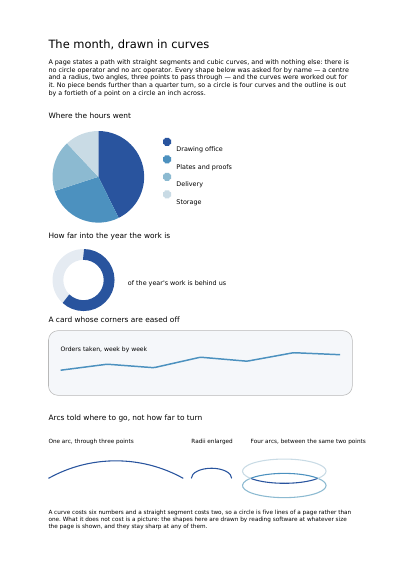
A Month's Report, Its Charts Drawn in Curves
A pie of where the hours went, a ring gauge of how far into the year the work is, a card with eased corners, and arcs told where to go rather than how far to turn.
Open the PDF The Whole Example
Also shown in: Cutting out What You Draw · Dashed and Dotted Lines · Transparency and Blend Modes
Summary
The free pencil: you set the tip down, and the line follows wherever you take it. Straight segments make triangles, arrows and polygons; curves make round corners, waves and perfect circles. This is what a rule under a heading, a band behind a title and the ornament on a certificate are made of.
Technically
Asked for with
"type": "path"
A path is a sequence of segments written straight into the page content stream and applied in order: move_to opens a subpath at a point with m, line_to extends it with a straight edge with l, curve_to appends a cubic Bézier through two control points with c, and close shuts the subpath back onto its origin with h. A page holds no circle operator and no arc operator, so eight further segments ask for a shape by name and the curves are worked out for it: circle, ellipse, arc, rounded_rect and rounded_polyline each open a subpath of their own, and arc_to, arc_through and elliptical_arc carry on from where the path already stands. No piece bends further than a quarter turn, so a circle is four curves. Each coordinate is a number or an expression, so a path sits against the page width without the customer computing anything; the radii are plain numbers and the angles are degrees counter-clockwise. Painting is said in two independent keys, the fill and the stroke; the fill takes a colour or the name of a declared gradient. An optional clip limits what the item shows, and it holds for that item alone: the items after it stay whole.
Request Schema
Required key: segments, an array of steps, each {"move_to": {"x", "y"}}, {"line_to": {"x", "y"}}, {"curve_to": {"x1","y1","x2","y2","x","y"}} or the string "close"; each coordinate is a number or an expression. Eight steps name a shape instead: {"circle": {"centre", "r"}}, {"ellipse": {"centre", "rx", "ry"}}, {"arc": {"centre", "r", "start", "sweep"}}, {"arc_to"} with those same four, {"arc_through": {"from", "via", "to"}}, {"elliptical_arc": {"from", "to", "rx", "ry", "large", "clockwise", "x_rotation", "enlarge_radii"}}, {"rounded_rect": {"rect", "radius"}} and {"rounded_polyline": {"points", "radius", "close"}}; a centre, a from, a via, a to and each of points is an object of x and y, rect is the usual four corners, r, rx, ry and radius are lengths in points, start, sweep and x_rotation are degrees counter-clockwise, and large, clockwise, enlarge_radii and close are false by default. enlarge_radii scales both radii of an arc too small to reach from one end to the other by the least that lets them reach; a radius below nothing grooves every corner of a rounded_polyline, cutting into it rather than off it. A step {"svg_path": {"d", "x", "y", "scale"}} adds the outline the SVG path data d describes, every command of the SVG path grammar read: a point of the path lands x plus scale times its first coordinate across and y less scale times its second up, the SVG origin landing at x, y; scale is 1 by default. In place of x, y and scale, the step takes rect, the usual four corners, into which the outline is fitted as a picture is: view, four numbers [min x, min y, width, height] in the path's own units, the viewBox attribute of the SVG file, names the box fitted, the box the outline traces by default; fit is a bare mode or a policy, as an image takes it without clip and scale, stretch by default; the top of that box lands at the top of what it is fitted to. Naming rect beside x, y or scale, view or fit without rect, neither rect nor both x and y, or a fit naming clip or scale is refused. A d that does not read is refused with the byte it stops at, and text along a path refuses this step. Optional: fill, a colour or {"shading": "name"}; stroke, an object with a required width plus color (default black), dash (an object with a required lengths and a phase, default 0), cap (butt by default, round, projecting) and join (miter by default, round, bevel); clip, an object with a required segments and a rule (nonzero by default, even_odd); graphics_state, the name of a declared graphics state; pages, an array of one-based integers, default empty; transform, six numbers; rotate, degrees counter-clockwise about the centre of the rectangle; layer, the name of a declared layer. Cross refusals: transform together with rotate; a clip whose segments are empty; a radius of nothing, an arc whose two ends are the same place, radii too small to reach from one end to the other without enlarge_radii, three points that name no circle, an arc of a circle whose radius is below nothing, and a run of fewer than two points. A shape takes fill, stroke, or both. fill_rule, nonzero by default or even_odd, says which side of the shape the fill counts as inside: even_odd leaves a subpath drawn inside another empty, so a disc inside a disc fills as a ring, and naming it without a fill is refused. stroke also takes miter_limit, how far a miter corner may run out before it is cut off square, as a ratio of the corner's length to the line's width, 10 by default.
A Whole Request That Creates a PDF
{
  "items": [
    {
      "type": "path",
      "clip": { "rule": "nonzero", "segments": [
        {"move_to": {"x": 60, "y": 690}},
        {"line_to": {"x": 290, "y": 690}},
        {"line_to": {"x": 290, "y": 790}},
        {"line_to": {"x": 60, "y": 790}},
        "close"
      ] },
      "segments": [
        {"move_to": {"x": 72, "y": 700}},
        {"line_to": {"x": 272, "y": 700}},
        {"line_to": {"x": 172, "y": 780}},
        "close"
      ],
      "fill": [0.85, 0.89, 0.95],
      "stroke": {"width": 1.0}
    }
  ]
}Shapes
A Rectangle, Filled or Outlined A Straight Line between Two Points A Drawing Declared Once and Placed as Often as Wanted
Where to Go Next
Every JSON key of a request, in one page The other twenty-two things you can draw