The Areas a Page States
State what reading software shows of a page and what a printing works does with it: the cut, the ink overrun, the useful area.
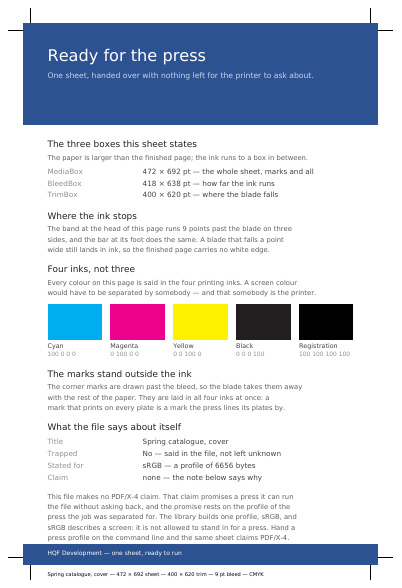
See It in a Real PDF
A Sheet Prepared for the Printing Works
One sheet larger than the finished page: the colour runs three millimetres past the blade, the trim marks stand outside it in an ink every plate carries, every colour is said in the four printing inks, and the page names the paper, the edge of the ink and the cut. Hand it the profile of a press and it claims PDF/X-4, and the sheet prints on itself which profile it is standing on.
Open the PDF The Whole Example
Also shown in: A Sheet as It Goes to the Press
Summary
When a printer makes a business card, the ink goes onto a larger sheet and the card is cut out afterwards. So that the colour truly reaches the edge, it runs a little past the cut: the blade never falls in exactly the same place twice. Each of these boxes is a rectangle, given by its four edges — left, bottom, right and top — and it travels with the page.
Technically
Written at the top level of a request, under
"page_boxes"
page_boxes writes, page by page, the four boxes a PDF knows beyond the sheet itself, in points: /CropBox, what reading software shows and prints; /BleedBox, the ink overrun; /TrimBox, the cut; and /ArtBox, the useful area. Each box stays out of the file until the request writes it, and reading software then falls back to the /MediaBox. A box running off the sheet is accepted: reading software intersects it with the sheet, so it simply says more than it is worth.
Request Schema
-
page_boxes— array, optional, empty by default. -
page_boxes[].page— integer ≥ 1, required. The page the entry is for. -
page_boxes[].crop— object, optional. What reading software shows and prints. Anything outside stays in the file and stays there for whoever wants it back. -
page_boxes[].bleed— object, optional. What the press lays ink on, ink that runs past the cut. -
page_boxes[].trim— object, optional. Where the blade falls: the page as it leaves the bindery. -
page_boxes[].art— object, optional. What is worth keeping of the page, what is drawn on it without its margins. -
Every box has
llx,lly,urx,ury: numbers, all required. They are the left, bottom, right and top edges, in points up and across from the foot of the sheet.
An entry says what is done with a page, not that there is one: a page named past the end of the document leaves the document as long as it already was. A page named twice takes the last entry, whole.
A Whole Request That Creates a PDF
{
  "page_boxes": [
    {
      "page": 1,
      "bleed": { "llx": 9, "lly": 9, "urx": 586, "ury": 833 },
      "trim": { "llx": 18, "lly": 18, "urx": 577, "ury": 824 }
    }
  ],
  "standard_fonts": [{ "name": "sans", "face": "helvetica" }],
  "items": [
    {
      "type": "rect",
      "rect": { "llx": 0, "lly": 0, "urx": 595, "ury": 842 },
      "fill": [0.93, 0.95, 0.98]
    },
    {
      "type": "text",
      "rect": { "llx": 60, "lly": 740, "urx": 535, "ury": 765 },
      "content": ["The colour runs past the cutting line"],
      "font": "sans",
      "font_size": 14
    }
  ]
}
The sheet, and what is laid under it
The Size of the Pages A Size of Its Own for Certain Pages The Unit a Page Is Measured In Where a Page's Sheet Sits in the Drawing The Shapes a Page Lays over What It Draws Which Way up a Page Is Shown How a Page Arrives, and How Long It Stands A PDF You Send, as the Pages Themselves How Far a Supplied PDF Is Allowed to Unpack The Template under the Pages A Watermark Laid across a Run of Pages Named Regions a Page Marks for Filling
Where to Go Next
Every JSON key of a request, in one page The other forty-one settings of a request