The File's Weight and the Time It Takes
Set how hard the document compresses: the fastest, the smallest, or a file readable in a plain text editor.
See It in a Real PDF
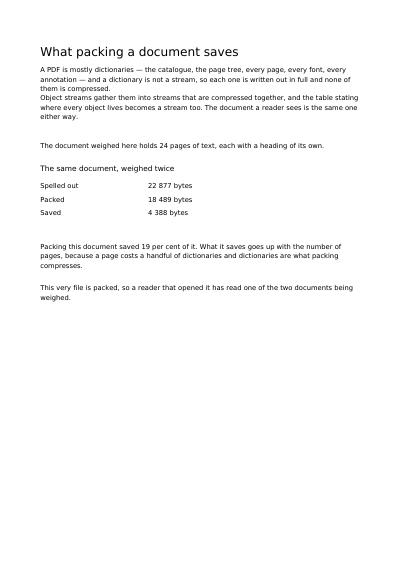
One document written twice: once uncompressed, once compressed. The page gives both file sizes and what the compression saved.
Open the PDF The Whole Example
Also shown in: A Sheet That Measures What It Says
Summary
When you pack clothes into a suitcase, you can fold them quickly or press them down at length. The result fits in the same bag, but not in the same space and not in the same time — and that is the whole trade here. The mode that presses nothing at all is the odd one out: it is there for the day you want to open the file in a plain text editor and read what is inside.
Technically
Written at the top level of a request, under
"compression"
compression sets how hard the document's streams are deflated. Three settings exist: whether to compress at all, the level from 1 to 9, and the gathering of the objects that are not streams into /ObjStm object streams behind an /XRef cross-reference stream. That last one cuts a document rich in small objects down markedly, and asks for reading software that knows PDF 1.5; it stays off by default, so a file meant for older reading software comes out as it is.
Request Schema
-
compression— object, optional, absent by default. -
compression.enabled— boolean, optional,trueby default. A request naming the block and saying nothing about it compresses all the same, as every document does. Set tofalse, the file opens in a text editor. -
compression.level— integer, optional, from 1 to 9. 1 is the fastest and leaves the most behind, 9 the smallest and the slowest. Absent, the engine keeps its own level. A number outside 1 to 9 is refused, and the answer names it. -
compression.object_streams— boolean, optional,falseby default. Gathers the objects that are not streams themselves into compressed streams, and writes the cross-reference table the same way. Wants PDF 1.5 at least. -
compression.cross_reference_stream— boolean, optional,falseby default. Writes the cross-reference table as a compressed stream and leaves every other object as it stands, which also lifts the ten-digit ceiling on where an object may lie.object_streamswrites the table this way already. Wants PDF 1.5 at least, and is refused besidefirst_page_first.
A Whole Request That Creates a PDF
{
  "compression": { "level": 9, "object_streams": true },
  "standard_fonts": [{ "name": "sans", "face": "helvetica" }],
  "items": [
    {
      "type": "text",
      "rect": { "llx": 60, "lly": 740, "urx": 535, "ury": 762 },
      "content": ["Packed as small as it goes"],
      "font": "sans",
      "font_size": 14
    }
  ]
}What is drawn, and how it comes out
Everything That Can Be Drawn on a Page The First Page, Shown While the Rest Arrives Layers Reading Software Shows or Hides A Name That Stands for Several Layers at Once A Drawing Made Once, Shown by a Button Drawings Read from SVG Files The Sets of Layers Reading Software Offers Layers Reading Software Shows One of at a Time
Where to Go Next
Every JSON key of a request, in one page The other forty-one settings of a request