A minimal PDF
Two identical pages carrying the bones of an invoice in plain shapes, and not a word of text: a file of a dozen kilobytes, with no font embedded.
What a PDF weighs shows when it is being sent to two thousand people, or still kept decades from now, or opened over a telephone connection at the far end of a field. A document spends a large share of itself on bookkeeping — where each page begins, which font goes where, which area is clickable — and every character of it is written out in plain view.
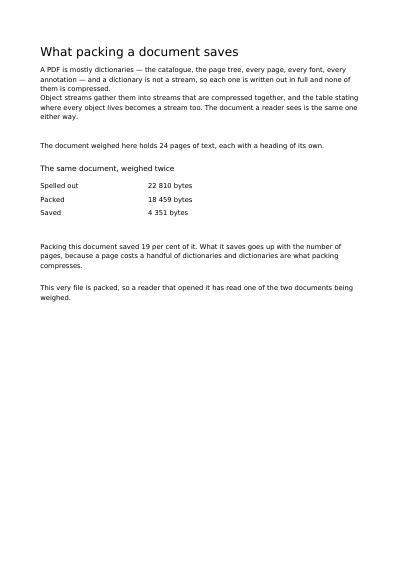
Packed away, that bookkeeping takes a fraction of the room, and the saving grows with the number of pages because every page adds its own share of it. The document below reports on a second one of twenty-four pages, written both ways, so the two weights sit side by side and neither is a claim. Nothing on any page changes: the same document comes out either way, and only its size differs.
Packing and showing the first page first are asked one at a time. A packed document cannot also be written to show its first page before the rest has arrived, and a request asking for both is refused before a byte is written.
Nothing is left out and nothing is simplified: this is the program exactly as it runs, for the developer who uses this library. The third is the description itself: a plain list of what the page has to say, which is what the service is sent.
Read the Rust source Read the Python source Read the JSON source
Two identical pages carrying the bones of an invoice in plain shapes, and not a word of text: a file of a dozen kilobytes, with no font embedded.
The same document written twice, the ordinary way and with its first page moved to the head of the file, with how much of each must arrive before page one appears.
A page that opens with nothing typed and prints like any other, and that asks the reading software to leave its text where it is. Every word of it is scrambled inside the file.
A page nothing shows until its password is typed in: no first line, no preview, no picture of it anywhere. The password is given on the example's page, to be tried.
Text set in a font embedded in the file, cut down to the letters actually used, and still searchable, copyable and readable aloud.
A tick, a cross and a dash drawn by the program, added to the document as a font, and set among ordinary words.