A Drawing Made Once, Shown by a Button
Describe a drawing under a name, with lines and shapes, so a form button carries it as its icon.
See It in a Real PDF
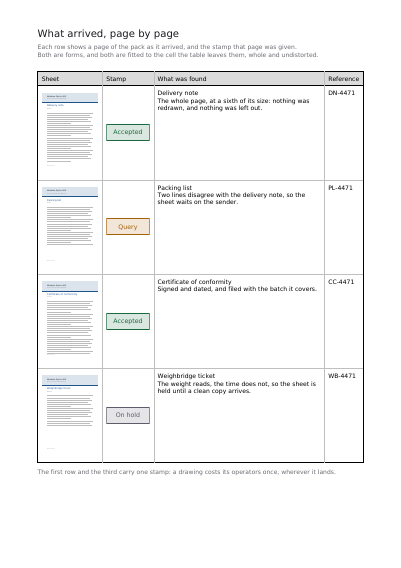
A Page and a Stamp inside Table Cells
A checking page for a pack somebody else sent: every row shows one of its pages, taken whole out of the file it arrived in, beside a stamp drawn once and placed in every row that was given it. Both are fitted to the cell the table leaves them, claiming no width from their column and no height from their row.
Open the PDF The Whole Example
Also shown in: The Notes a Program Leaves Itself · One Colour, Seen through Six Stencils · One Drawing, Placed Many Times
Summary
A button you click on says more with a small drawing on it than with a word: a green tick, an arrow, a cross. The motif is worked out from lines and shapes rather than photographed, so it stays crisp whether the button is the size of a stamp or of a postcard.
Technically
Written at the top level of a request, under
"drawings"
drawings declares the drawings the document defines for itself, each as a form XObject with its own /BBox and /Matrix, under the name a button's icon shows it by. A drawing carries the same items a page does — a path, a rectangle, a line, a block of text — laid out in a space of its own rather than on a sheet. Nothing fresh is invented there: they are the items the schema already has. It is written into the file once and painted by name, however many times it is shown. A drawing declared here is placed on a page by a drawing item, and shown as a button's icon by name.
Request Schema
-
drawings— array, optional, empty by default. -
drawings[].name— string, required. The name an icon shows it by. No other drawing of the request, declared or read from SVG, takes it. -
drawings[].box— object, required. The area of the drawing's space that is kept:llx,lly,urx,ury, numbers, all required. Nothing outside it is drawn. -
drawings[].items— array, required. The shapes it is made of, in drawing order. Four kinds:path,rect,line,text. -
drawings[].matrix— array of six numbers, optional. What the drawing's own space is worth in the space it is shown in. Absent, it is shown as it was drawn. -
An item of a drawing declaring
pages,layer,idorrelative_tois refused: a drawing is not on a page, and its coordinates name no page variable. - An image and a code are planned for a future version inside a drawing: a drawing has no access to the request's images.
-
The button showing it is a
push_buttonitem, through itsicon,rollover_iconordown_iconkey, withicon_fitfor the framing andlayoutfor where the caption sits. -
drawings[].transparency— object, optional. The drawing made a transparency group of its own, written as the document'stransparencyis, withspace,isolatedandknockout: its marks are composited together in the colour space named before the group meets what it is drawn over. A space nothing declared is refused, and no document claimingpdfa1aorpdfa1bcarries one. -
drawings[].reuse— object, optional. What a press is told about keeping the drawing once rendered:identity, a string shared by the objects that are the same artwork;scope, how long it may be kept, one ofsingle_use,record,file,stream,global,unknown;environment, a string naming the setting it was rendered in, which a drawing kept across files names. Each is optional; an identity or an environment that is empty or holds anything but printable ASCII is refused. -
drawings[].encapsulated— boolean, optional,falseby default. The drawing written self-contained: it comes out the same wherever it is placed, so a press may render it once and keep the result. Undervariable_print, one on a layer is refused.
A Whole Request That Creates a PDF
{
  "drawings": [
    {
      "name": "tick",
      "box": { "llx": 0, "lly": 0, "urx": 20, "ury": 20 },
      "items": [
        {
          "type": "line",
          "from": { "x": 3, "y": 10 },
          "to": { "x": 8, "y": 4 },
          "stroke": { "width": 2, "color": [0.09, 0.42, 0.24] }
        },
        {
          "type": "line",
          "from": { "x": 8, "y": 4 },
          "to": { "x": 17, "y": 16 },
          "stroke": { "width": 2, "color": [0.09, 0.42, 0.24] }
        }
      ]
    }
  ],
  "standard_fonts": [{ "name": "sans", "face": "helvetica" }],
  "items": [
    {
      "type": "push_button",
      "name": "approve",
      "rect": { "llx": 60, "lly": 740, "urx": 84, "ury": 764 },
      "font": "sans",
      "font_size": 10,
      "icon": "tick",
      "layout": "icon_only"
    }
  ]
}What is drawn, and how it comes out
Everything That Can Be Drawn on a Page The File's Weight and the Time It Takes The First Page, Shown While the Rest Arrives Layers Reading Software Shows or Hides A Name That Stands for Several Layers at Once Drawings Read from SVG Files The Sets of Layers Reading Software Offers Layers Reading Software Shows One of at a Time
Where to Go Next
Every JSON key of a request, in one page The other forty-one settings of a request