Which Way up a Page Is Shown
Turn a page a quarter turn before reading software shows it, without moving anything drawn on the sheet.
See It in a Real PDF
A Sheet as It Goes to the Press
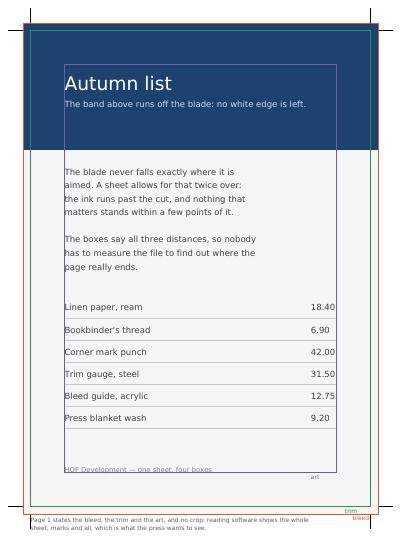
One drawing on four pages: a press sheet stating where the ink runs, where the blade falls and what is worth keeping, with trim marks; the same sheet cropped to the finished page; a landscape page that states a quarter turn clockwise on an upright sheet; and the first sheet again as the right half of a press sheet two pages wide.
Summary
In a report, a wide table sits better lying down than standing up. It is the gesture you make with a sheet of paper, turning it in your hands to read what is written sideways: what is drawn stays put, the sheet is what turns.
Technically
Written at the top level of a request, under
"page_turns"
page_turns writes /Rotate on the pages it names — 90, 180 or 270 degrees clockwise — which is the rotation reading software applies before showing the sheet. The content is not moved: the sheet turns. That is how a landscape page lives inside a portrait document. An upright page writes no /Rotate at all. It is a different thing from an item's rotate, which turns what is drawn on a sheet that stays where it is.
Request Schema
-
page_turns— array, optional, empty by default. -
page_turns[].page— integer ≥ 1, required. The page the entry is for. -
page_turns[].turn— string, required. Four values:upright(shown as it was drawn),right(a quarter turn clockwise),upside_down(a half turn),left(a quarter turn anticlockwise).
An entry says how a page is shown, not that there is one: a page named past the end of the document leaves the document as long as it already was. A page named twice takes the last turn given for it.
A Whole Request That Creates a PDF
{
  "page_turns": [{ "page": 1, "turn": "right" }],
  "standard_fonts": [{ "name": "sans", "face": "helvetica" }],
  "items": [
    {
      "type": "text",
      "rect": { "llx": 60, "lly": 740, "urx": 535, "ury": 765 },
      "content": ["Drawn upright, shown on its side"],
      "font": "sans",
      "font_size": 14
    }
  ]
}
The sheet, and what is laid under it
The Size of the Pages A Size of Its Own for Certain Pages The Unit a Page Is Measured In Where a Page's Sheet Sits in the Drawing The Areas a Page States The Shapes a Page Lays over What It Draws How a Page Arrives, and How Long It Stands A PDF You Send, as the Pages Themselves How Far a Supplied PDF Is Allowed to Unpack The Template under the Pages A Watermark Laid across a Run of Pages Named Regions a Page Marks for Filling
Where to Go Next
Every JSON key of a request, in one page The other forty-one settings of a request