A Barcode of Vertical Bars
Draw a barcode a scanner reads: Code 128, Code 39, Code 93, ITF-14, Codabar, EAN-13, UPC-A, EAN-8, UPC-E, GS1 DataBar and the two add-ons.
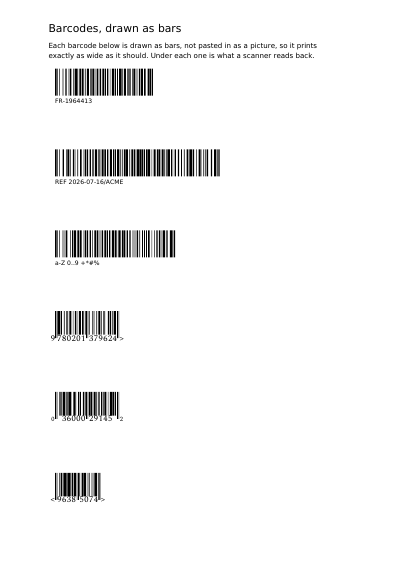
See It in a Real PDF
Stripes for the two jobs that want them: Code 128 for any text at all, and the three a till reads — EAN-13, UPC-A, EAN-8 — each with its last digit worked out rather than typed.
Open the PDF The Whole Example
Also shown in: Every Linear Barcode on One Page · A Till Receipt on a Paper Roll · A Sheet of Shelf Labels
Summary
The black bars the cashier passes under the little red lamp. You give the frame it must fit into, and the bars are drawn at the right width, with the white margin scanners ask for at either end. On a code a shop till reads, a few bars run deeper than their neighbours — one pair at each end and one down the middle — and the figures are set in the gap they leave. Because they are truly drawn rather than pasted in as a photo, they stay crisp in print, even on a tiny label. If you also want the number written out in figures under the bars, you add a block of text just below. Which kind of code is drawn is yours to choose. Code 128 carries any text. Code 39 and Code 93 carry capitals, digits and a few punctuation marks, which is what a workshop label, a store bin and a hospital wristband carry. ITF-14 is the code on the outer case a shop takes delivery of. Codabar is the code on a blood bag, a library card and a courier's airbill. EAN-13, UPC-A and EAN-8 are the article number a till reads, and UPC-E is that same number on a pack too small to hold it. A loose cut of meat or a piece of fruit carries a GS1 DataBar, which holds the article number in a symbol read from any angle. Beside a magazine's code or a book's stands a smaller block of bars — the add-on, EAN-2 or EAN-5 — carrying the issue number or the price the publisher suggests.
Technically
Asked for with
"type": "barcode"
The bars are filled rectangles written straight into the page content stream — no image, no font, no reading software plug-in. The bars and the quiet zones fill the rectangle's width. A module is the thinnest bar of the code, the unit every other width is counted in. On a retail code the guard bars — the pair at each end and the pair down the middle — take the rectangle's whole height, and every other bar stops five modules above its foot, which is the room the figures set under the code stand in; where five modules would be over half the height, the guards take half. A Code 128 has no guard bars, so all its bars take the whole height. The symbologies a request names: Code 128 carries the printable ASCII characters. Code set C writes two digits in one symbol — an odd count opens in code set B for the first digit — and code set B writes one character per symbol, so fourteen digits take 112 modules in code set C against 189 in code set B. Left to itself a Code 128 takes code set C for a content of digits alone and code set B for anything else, and code_set names one of the two instead; a content that is not digits alone is refused in code set C. Code 39 carries the ten digits, the capital letters, the space and the six characters -, ., $, /, + and %; a lower-case letter is refused, and check_digit adds the modulo 43 check character, which a scanner hands back with the text. Code 93 carries the same characters in about half the room and always carries its two check characters. ITF-14 carries fourteen digits: thirteen are the case number and the check digit is computed, fourteen are the whole code and the last is verified. Codabar carries the ten digits and the six characters -, $, :, /, . and +, and opens and closes with one of A, B, C or D, which a scanner hands back with the rest. For EAN-13, twelve digits are the number and the check digit is computed, thirteen are the whole code and the check digit is verified; the same rule holds for UPC-A at eleven or twelve digits, for EAN-8 at seven or eight, and for UPC-E at seven or eight, whose first digit is 0 or 1. The GS1 DataBar Omnidirectional, the code of a loose retail item, carries the fourteen-digit trade item number an ITF-14 carries: thirteen digits are the number and the check digit is computed, fourteen are the whole code and the last is verified, and any other count of digits is refused. EAN-2 takes exactly two digits and EAN-5 exactly five. Text the chosen symbology can encode is accepted; anything else answers 400. An add-on is no code of its own to a scanner: it is read as the tail of the retail code beside it, and only while the two stand close. The rectangle is divided by the code's module count plus twenty — ten blank modules kept at either end — so the nine blank modules the standard asks for between the bars of the two codes mean the add-on's rectangle begins eleven modules before the retail code's rectangle ends, both drawn at the same module. Set it further off, or shorter than the code beside it, and a scanner reads the retail code alone and drops the add-on without a word: we have a badly placed add-on refused on the next version; until then, the customer who puts both on the page keeps the gap. symbology reads the names above and nothing else.
Request Schema
Required keys: content, a string; rect. Optional: symbology, one of code128 (default), code39, code93, itf14, codabar, ean13, upc_a, ean8, upc_e, data_bar, add_on2 or add_on5; check_digit, true to carry the modulo 43 check character after a Code 39's text; code_set, b or c, the code set a Code 128 is written in, left out for the code to take c on a content of digits alone and b on anything else; fill, the colour of the bars (default black), written as colour is written everywhere else: one number for grey, three for red, green and blue, four for the four inks, {"gray": n}, or {"space": "name", "components": …}; pages, an array of one-based integers, default empty; transform, six numbers; rotate, degrees counter-clockwise about the centre of the rectangle; layer, the name of a declared layer. Cross refusals: transform together with rotate, check_digit on any symbology but code39, code_set on any symbology but code128, and code_set set to c on a content that is not digits alone. An EAN-13, EAN-8, UPC-A or UPC-E also takes digits, an object: font, required, the name of a declared font that states the height of its capitals, which is what the digits are sized by; light_margin, a boolean at false, true marking with a > right of an EAN code how far its light margin runs. The digits are set under the bars where the standard puts them; absent, the item draws the bars alone and the human-readable digits are laid with a text item. digits on any other symbology is refused, and so is light_margin on a UPC code, which marks none. module, an object of width, in points, and dpi, snaps the narrowest bar to whole pixels of the printer that prints the label: the rectangle is then a bound rather than a width to fill, the code starting at its left edge at the width the module gives it, and a code coming out wider than the rectangle answers 400. A module may state scanned in place of a width: where the code is scanned, one table of the GS1 General Specifications each, retail_point_of_sale, general_distribution, retail_and_distribution, neither_retail_nor_distribution or logistic_units; the module is then the width the table is designed around, on a whole number of the printer's pixels.
A Whole Request That Creates a PDF
{
  "items": [
    {
      "type": "barcode",
      "content": "FR-1964413",
      "symbology": "code128",
      "artifact": "footer",
      "rect": {"llx": 72, "lly": 700, "urx": 237, "ury": 740}
    },
    {
      "type": "barcode",
      "content": "40063813339301",
      "symbology": "code128",
      "code_set": "c",
      "rect": {"llx": 72, "lly": 640, "urx": 237, "ury": 680}
    }
  ]
}Barcodes and Square Codes
A Square QR Code, Read with a Phone An Aztec Code, with No White Margin around It A Data Matrix Code, Very Small and Very Sturdy A PDF417 Code, Carrying a Whole Form
Where to Go Next
Every JSON key of a request, in one page The other twenty-two things you can draw