An invoice laid on a letterhead template
An invoice laid over a letterhead supplied as a PDF file.
A form that has to be printed, filled in with a pen, scanned and sent back is a form a good half of your customers never return. The alternative is a document filled in where it is read and returned typed — which is also the only version anybody can read afterwards, and the only one a machine can take the answers out of.
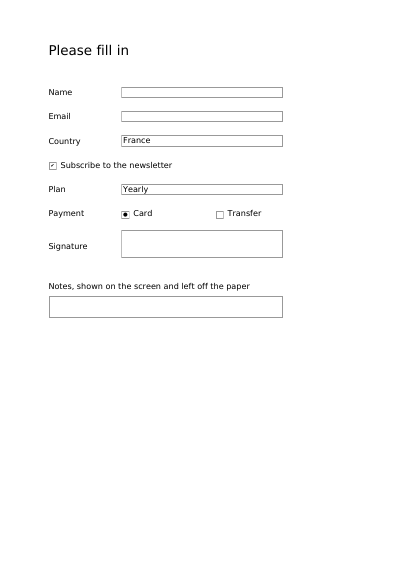
On this one there are boxes to type in, a box to tick, a list to choose from, a set of buttons where only one may be chosen, and a place to sign — and every one of them has a visible frame around it. That is worth saying, because a PDF form draws no frame unless somebody asks: without it a reader sees a blank page and has to hunt with the mouse for the places that accept typing.
Nothing is left out and nothing is simplified: this is the program exactly as it runs, for the developer who uses this library. The third is the description itself: a plain list of what the page has to say, which is what the service is sent.
Read the Rust source Read the Python source Read the JSON source
An invoice laid over a letterhead supplied as a PDF file.
A maintenance agreement somebody else sent, with a signature area, a date and a line of one's own laid over its last page and an annex added after it, every byte of the agreement left where it was.
A supply agreement standing on three templates the customer sent: a headed page under the front page, a plain page under every page the schedule runs to, and a page of conditions that goes in whole.
What you get before you pay anything: a watermark across every page, and the same pages under it, laid out exactly as a paid copy lays them out. This is also the document that says what a licence key changes, and why every figure on this site is measured with one.
A page carrying a digital signature that any change to the file breaks, made with a certificate that exists only for the demonstration. Every command that made the key and the signature is printed on the page, with the one that checks it without this library.
A form that is also a PDF/A-3 file: every field already drawn, with a visible frame, expecting nothing from reading software.