A Patch of Page a Reader Clicks
Make a patch of page clickable: it opens a web address, or takes the reader to another page of the same document.
See It in a Real PDF
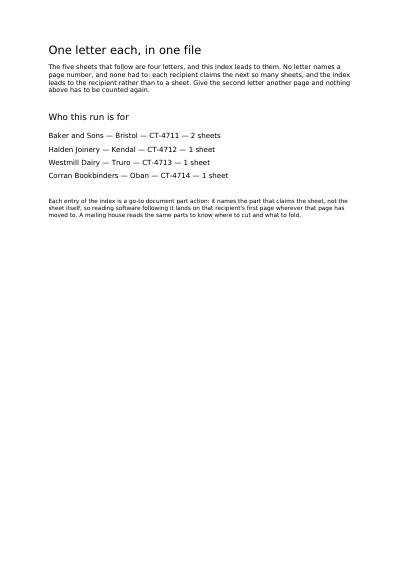
One Letter per Recipient, All in the Same File
Four personal letters behind a contents page. The letters have no page numbers: each recipient gets the pages that follow their own, as many as are needed. Each line of the contents leads to the letter it names.
Open the PDF The Whole Example
Also shown in: Links and Marks on Placed Text · A Slideshow That Runs Itself · Internal and External Links
Summary
It is invisible: it lies over whatever is already drawn, usually over a piece of text you coloured blue so people can see it is clickable. A jump inside the document works the way a table of contents does — the reader lands on the right page without scrolling for it. On paper the sheet stays as it is; on screen, the patch turns your document into something you browse.
Technically
Asked for with
"type": "link"
A link is a /Subtype /Link annotation laid over the items already drawn, its /Rect given in points: it makes do with the pages those items created, so a link named beyond the last page simply stays aside. Its target is written in two ways: the short form, which gives an address or a page number, or the full action, which further gives the view a page opens at, a named destination, a document part, a reading move, the sending and the resetting of a form, and the showing and the hiding of the fields it names. Whichever is written, the annotation has either a /Dest or an /A action, never both at once: each link states one or the other, which keeps a single possible reading.
Request Schema
Required key: rect. Exactly one target key: to, either {"uri": "address"} or {"page": n} with n ≥ 1; or action, one of {"uri": …} (a string, or an object with a required uri and track_pointer, default false), {"page": …} (an integer ≥ 1, or an object with a required page and a fit, default "whole_page"), {"destination": "name"}, {"part": n} with n ≥ 1, {"menu_item": …} being next_page, previous_page, first_page or last_page, {"transition": {"effect": …, "seconds": …}}, which shows the page viewing area as the action before it left it, brought in by that transition, and takes the same effect and seconds a page takes, {"reset_fields": {"fields": …}}, {"submit_fields": {…}} with a required url, an optional fields and a format (default {"fdf": {"with_no_value": false}}, also {"html": {"get": …, "with_click": …}}, "xfdf" and {"whole_document": {"get": …}}), {"import_fields": {"file": "name"}}, {"show": ["field", …]} or {"hide": ["field", …]}. A field set is written {"only": …} or {"all_but": …}; absent, it means the whole form. show brings the fields named back into view and hide takes them out of it, each name being the name a field reports its answer under, every field nested under it following; a name the document does not carry is refused, and a field out of view keeps its answer, which a form that is sent carries. In part, n is a page number and not the rank of a part: the reader is taken to the part that claims page n, and a page no part claims is refused. Optional: highlight, what reading software shows while the pointer is held down on it, one of none, invert, outline or push; absent leaves it to the reading software. over, an array of quadrilaterals, each four [x, y] corners counterclockwise from the one its bottom edge starts at, the patches of page it is clickable over; absent leaves its rectangle the whole of it, which is what a sentence on one line takes. description, a string, what the link leads to said in words; border, the frame drawn around it, absent drawing none; layer, the name of a declared layer. pages, an array of one-based integers, default empty. Cross refusals: to together with action; neither of the two; a page outside the document. Beyond those, action also takes {"other_document": {"file": …, "page": n}}, a page of another PDF, with an optional element and new_window; {"launch": {"file": …}}, another file or an application, with an optional new_window; {"viewer_command": "FullScreen"}, a move reading software offers by name; and {"switch_layers": {"switches": [{"layer": …, "switch": "toggle"}], "ignoring_radio_groups": false}}, which turns declared layers on, off or over. action also takes {"attachment": {"file_name": …, "page": n}}, a page of a PDF file the document carries, named by the file_name it is carried under and refused where no PDF is carried under that name, with an optional fit and new_window, which needs PDF 1.6; {"carried_path": {"path": [{"child": …}, {"annotation": {"page": n, "name": …}}, "parent"], "page": n}}, a page of a PDF file reached one step after another, child going into the file the current one carries under that name, annotation into the file the file attachment annotation of that name on that one-based page carries, and parent out to the file that carries the current one, with the same optional fit and new_window; an empty path, or a first step leading into no PDF file this document carries, is refused, the steps after it lie in other files and are not checked, and it needs PDF 1.6; and {"script": …}, a script run as it is given, which no document claiming one of the first three parts of PDF/A carries. A link also takes mark, the label the structure tree claims it by through a node's annotations, a link placed on several pages filing one link per page under it.
A Whole Request That Creates a PDF
{
  "standard_fonts": [{"name": "sans", "face": "helvetica"}],
  "layers": [{"name": "Notes"}],
  "items": [
    {
      "type": "text",
      "rect": {"llx": 72, "lly": 740, "urx": 300, "ury": 760},
      "content": ["Visit hqf-pdf.com"],
      "font": "sans",
      "font_size": 14,
      "color": [0.11, 0.31, 0.55]
    },
    {
      "type": "link",
      "rect": {"llx": 72, "lly": 740, "urx": 300, "ury": 760},
      "to": {"uri": "https://hqf-pdf.com/"},
      "border": { "solid": { "color": [0.11, 0.31, 0.55], "width": 0.5 } },
      "highlight": "invert"
    },
    {
      "type": "text",
      "rect": {"llx": 72, "lly": 700, "urx": 300, "ury": 720},
      "content": ["Read on"],
      "font": "sans",
      "font_size": 14,
      "color": [0.11, 0.31, 0.55]
    },
    {
      "type": "link",
      "rect": {"llx": 72, "lly": 700, "urx": 300, "ury": 720},
      "action": {"menu_item": "next_page"}
    },
    {
      "type": "text",
      "rect": {"llx": 72, "lly": 740, "urx": 300, "ury": 760},
      "content": ["The page the move lands on"],
      "font": "sans",
      "font_size": 14,
      "pages": [2]
    },
    {
      "type": "text",
      "rect": {"llx": 72, "lly": 660, "urx": 300, "ury": 680},
      "content": ["A note shown or hidden by the link above it"],
      "font": "sans",
      "font_size": 11,
      "layer": "Notes"
    },
    {
      "type": "link",
      "rect": {"llx": 72, "lly": 680, "urx": 300, "ury": 695},
      "action": {
        "switch_layers": {"switches": [{"layer": "Notes", "switch": "toggle"}]}
      }
    }
  ]
}Where to Go Next
Every JSON key of a request, in one page The other twenty-two things you can draw